
If you’ve ever left a CS lecture with pages of scribbles but still couldn’t solve the homework, you’re not alone. Learning how to take notes in computer science is different because you’re juggling syntax, logic, and tradeoffs—often at the same time.
- Quick Start: If you only have 10 minutes, do this…
- Why do computer science lecture notes feel more complex than other classes
- How to take notes in computer science with the C3 System (overview)
- C1: Code (what to capture in programming lecture notes, what to skip)
- C2: Concept (the “why” behind the code)
- C3: Complexity (tradeoffs, constraints, pitfalls)
- Set up before class (5 minutes)
- During the lecture, the C3 capture flow
- After class: the 15-minute “Compile Pass.”
- Example Box: C3 notes for data structures (hash tables + collisions)
- Examples: lecture + lab + midterms week
- When you’re behind: today + next 48 hours plan
- Mini-quiz: Are your notes actually helping?
- Common mistakes in CS note-taking (and quick fixes)
- Free C3 Note Template (copy/paste)
- Quick checklist before you close your laptop
- A short script for office hours (so you don’t freeze)
- Optional: quick comparison of note-taking methods for CS
- Key takeaways
- FAQ
- Conclusion
Snippet-ready definition: In computer science, practical notes are a problem-solving tool: they capture (1) the code pattern, (2) the concept that explains it, and (3) the constraints—like time/space complexity and edge cases—that determine whether it works.
This guide is for college students in the U.S. taking intro programming, data structures, systems, or theory—especially if you’re trying to build CS lecture notes that actually help with labs, quizzes, and midterms.

Quick Start: If you only have 10 minutes, do this…
- Open the C3 template (below)—your computer science notes template—and paste today’s lecture title at the top.
- Create three sections: Code, Concept, and Complexity.
- During class, write only: one “golden” code pattern, the rule it demonstrates, and 1–2 tradeoffs/edge cases.
- After class, do a 5-minute “Compile Pass”: add one test case and one common bug.
Why do computer science lecture notes feel more complex than other classes
CS moves fast because instructors compress a lot into small examples. A five-line function might hide:
- an algorithmic idea (like recursion or hashing),
- a data structure invariant,
- and performance costs that matter on exams.
Next step: Stop trying to write “everything.” Your computer science class notes should help you recreate solutions later, not record the lecture word-for-word.
How to take notes in computer science with the C3 System (overview)
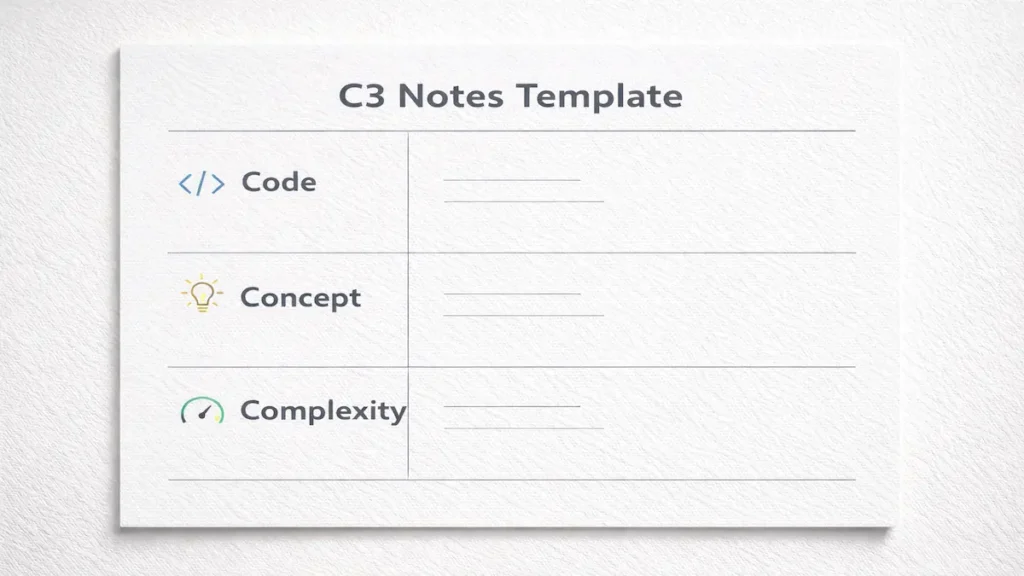
The Code–Concept–Complexity (C3) System is a repeatable way to take notes that mirrors how CS problems are graded:
- Code: the pattern you’ll reuse (not the entire program).
- Concept: the principle that tells you when the pattern applies.
- Complexity: the constraints and tradeoffs that explain why one approach beats another.
Next step: Use C3 as your default page layout for every lecture and lab.
C1: Code (what to capture in programming lecture notes, what to skip)
Your goal is to capture “rebuildable” code—small chunks you can reproduce from memory.
Capture:
- function signatures and I/O shape
- the core loop/recurrence
- a standard pattern (two pointers, BFS queue, binary search template)
- minimal comments and common abbreviations that explain intent
Skip:
- long boilerplate
- imports/setup unless the instructor emphasizes them
- entire slide dumps (you can download lecture slides later)
Next step: When you see a key pattern, label it like PATTERN: BFS with visited set. This is the fastest way to create usable coding notes.
C2: Concept (the “why” behind the code)
Concept notes are where you earn points on exams and in office hours. This is what makes your code reusable.
Write 2–4 lines answering:
- What problem type is this?
- What invariant stays true?
- What triggers this approach instead of another?
Example concept lines:
- “Use a stack when you need last-in-first-out + matching structure (parentheses, DFS backtracking).”
- “HashMap supports fast lookup; trade memory for speed.”
Next step: Force yourself to write one sentence starting with: “This works because…”
C3: Complexity (tradeoffs, constraints, pitfalls)
In CS, “works” isn’t enough. Complexity is often the difference between partial and complete credit.
Write:
- time complexity + why
- space complexity + why
- failure modes (edge cases, off-by-one, recursion depth)
- constraints mentioned in the lecture (input size, memory limits)
Next step: Add one edge case per topic (empty input, duplicates, negative numbers, worst-case graph). Treat it like an edge cases checklist you built all semester.
Set up before class (5 minutes)
This is the easiest way to improve your notes without spending extra hours.
Do this before you walk into lecture (or open Zoom):
- Title + date + unit (e.g., “Week 4: Trees — Traversals”)
- Paste the day’s learning objectives if posted
- Add a small “Questions for office hours” box
- Leave a blank “Exam triggers” line (you’ll fill it later)
Next step: Open your template before class starts so you’re not formatting while the professor is proving Big-O.
During the lecture, the C3 capture flow
Here’s the flow to follow while the professor is talking (or coding live):
- Start in Concept when the topic is introduced.
- Switch to Code only when a reusable pattern appears.
- Immediately add Complexity if the professor compares approaches.
Follow this 5-step loop every time:
- Write the problem being solved in one line.
- Capture the smallest code pattern that solves it.
- Add one “This works because…” concept sentence.
- Note time/space complexity + one edge case.
- Mark anything unclear with “??” for later.
Next step: Use “??” aggressively. It’s faster than falling behind, and it creates a to-do list for your review.
After class: the 15-minute “Compile Pass.”
Most students never do this, which is why their notes don’t help during exam revision.
Set a timer for 15 minutes:
- Fix formatting (make code readable)
- Add one example input/output
- Write one retrieval practice question (“When do we use BFS instead of DFS?”)
- Add one common bug (“Forgot to mark visited when enqueuing.”)
Next step: Do the Compile Pass the same day—this is what turns CS lecture notes into study material.
Example Box: C3 notes for data structures (hash tables + collisions)
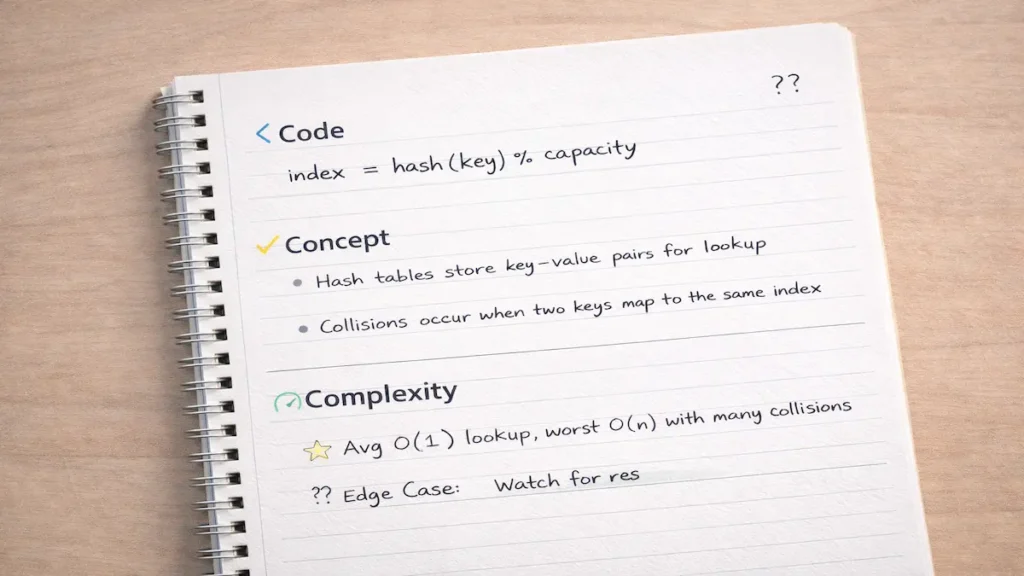
Lecture topic: Hash tables and collisions
Concept:
Hash tables store key→value pairs for fast lookup. Collisions happen when two keys map to the same index. We handle this with chaining or open addressing.
Code (pattern):
index = hash(key) % capacity
chaining: bucket[index].append((key,value))
lookup: scan bucket for key
Complexity:
Average O(1) lookup with good hashing; worst-case O(n) if many collisions. Space O(n). Watch for resizing threshold/load factor.
Next step: Highlight the exam trigger: “Explain average vs worst-case and when worst-case happens.”
Examples: lecture + lab + midterms week
Example 1: Lecture notes (Intro Programming)
You’re learning loops and arrays. The instructor shows a pattern for “find the maximum.”
- Code: a loop that tracks max_so_far
- Concept: invariant: max_so_far is the max of seen elements
- Complexity: O(n) time, O(1) space; edge case: empty array
Next step: Add one tiny test case: [3, -2, 7] → 7.
Example 2: Lab notes (Debugging in C++/Java/Python)
In the lab, you’re not just learning content—you’re building instincts.
- Code: “print-debug / breakpoint / assert” pattern
- Concept: isolate variables; reduce the failing case
- Complexity: not Big-O, but cost of debugging: note the quickest check first
Next step: Write a “bug diary” line: “If segmentation fault, check indices + null pointers before logic.”
Over time, this becomes your personal debugging notes library.
Example 3: Midterms week + part-time job
It’s Tuesday. You have a 4–9 p.m. shift and a midterm on Thursday. You can’t reread everything.
Use your notes to drive retrieval practice:
- Pull 10 concept questions from your Compile Pass
- redo 3 code patterns from memory
- Pick 2 topics where complexity/edge cases are fuzzy
Next step: Study from questions, not paragraphs. Your notes should already contain the prompts.
When you’re behind: today + next 48 hours plan
If you’re overwhelmed or dealing with missed lectures, you don’t need a perfect system—you need traction.
Today (45–60 minutes):
- Pick the last two lectures only.
- For each: fill C3 with one core pattern, one concept, one complexity note.
- Do 5 minutes of retrieval practice per lecture (no notes).
Next 48 hours (two short blocks):
- Block 1: attend or watch the lecture at 1.25x, mark “??” only
- Block 2: do the Compile Pass + create a mini problem set (3 questions)
Next step: Start with the most recent content. CS builds; catching up backward often wastes time.
Mini-quiz: Are your notes actually helping?
Score each item 0 (no), 1 (kind of), 2 (yes). Total /10.
- Can you reproduce the key code pattern without looking?
- Do you have at least one “This works because…” sentence per topic?
- Did you write time/space complexity for major algorithms?
- Do you have at least one edge case per lecture?
- Do your notes include 2–3 retrieval practice questions?
Score guide:
- 0–4: your notes are primarily a transcript
- 5–7: usable, but missing constraints and prompts
- 8–10: exam-ready and homework-friendly
Next step: If you scored under 6, run a Compile Pass tonight on the last lecture.
Common mistakes in CS note-taking (and quick fixes)
- Copying lecture slides instead of extracting patterns
- Fix: write only one “golden” pattern per concept; link slides separately.
- Saving code but skipping the why
- Fix: add one sentence starting “This works because…” every time.
- Ignoring complexity until the night before the exam
- Fix: add time/space immediately when the instructor compares solutions.
- Never noting edge cases
- Fix: add an “Edge Cases” line under Complexity and fill one for each topic.
- Taking notes in one huge document with no structure
- Fix: Use the same C3 headings every class to organize lecture notes predictably.
Free C3 Note Template (copy/paste)
Use this code notes template for lectures, and reuse the same layout for taking notes on algorithms and data structures (review lecture notes faster because every page looks the same).
Course / Professor:
Date / Topic:
Lecture goal (1 sentence):

Code (C1)

Pattern name:
Core snippet (minimal):
Inputs/Outputs:
Common bug:

Concept (C2)

This works because…
When to use it:
Key invariant / rule:

Complexity (C3)

Time:
Space:
Edge case:
Tradeoff vs alternative:

Retrieval Practice (write 2)

Q1:
Q2:

Questions for office hours

??
Quick checklist before you close your laptop
- One core pattern captured
- One “This works because…” sentence
- Complexity written
- One edge case
- Two retrieval practice questions
A short script for office hours (so you don’t freeze)
“Hi, I’m working on [topic]. I understand the main idea is [concept].
I get stuck when [specific step]. Can you show me how you’d think through an example with [edge case]?”
Optional: quick comparison of note-taking methods for CS
| Method | Works for CS? | Best use |
|---|---|---|
| Cornell notes | Sometimes | Concept-heavy lectures (theory) |
| Outline notes | Often | Organizing units + definitions |
| C3 System | Yes | Most CS lectures/labs: patterns + constraints |
Key takeaways
- Use C3 so that every page captures the pattern, principle, and constraints.
- Write rebuildable code snippets, not complete programs.
- Add “This works because…” to make ideas reusable.
- Record time/space complexity when it’s taught, not later.
- Do a same-day 15-minute Compile Pass for exam-ready notes.
- Turn notes into retrieval practice prompts for faster studying.
FAQ
Should I take CS notes on paper or a laptop?
A laptop is usually better for code formatting and quick edits. Paper can work if you’re easily distracted, especially with ADHD, or if you rewrite digitally during your Compile Pass.
How much code should I write in my notes?
Only the smallest reusable pattern: the core loop/recurrence and key lines. If you can’t rebuild it later, it’s too long.
What if the professor posts lecture slides—do I still need notes?
Yes. Slides are a reference; your notes are your thinking tool. Your notes should explain when and why you’d use a technique.
How do I take notes during live coding without falling behind?
Use “??” markers instead of pausing to perfect formatting. Capture the pattern, then clean it up during the Compile Pass.
How do I take notes for CS labs?
Treat labs like a “bug and pattern log.” Capture common errors, debugging steps, and the small code patterns you keep reusing.
Conclusion
Once you stop transcribing and start capturing patterns, principles, and constraints, your notes become something you can actually study from. Try the C3 template in your following lecture, run the 15-minute Compile Pass, and you’ll feel the difference by the next homework set—especially if you’ve been unsure about how to take notes in computer science.—and even in your biology notes.