Best Desk Accessories for Students: 15 Useful Picks for 2026
August 30, 2026 / By
mind life up / 14 minutes of reading
Disclosure: This post contains affiliate links. As an Amazon Associate, we earn from qualifying purchases at no extra cost to you.
Read more
Finding the best desk accessories for students is less about filling your desk with gadgets and more about choosing a few products that make studying easier. Better lighting, cleaner cable management, comfortable laptop positioning, and convenient charging can make a small study space much more practical.
That matters even more in a dorm room or shared apartment, where desk space is limited. The right student desk accessories should earn their place instead of adding more clutter.
For this guide, we focused on useful products and established brands available to U.S. shoppers. Whether you are building a college desk setup from scratch or upgrading an existing study station, these picks cover productivity, organization, comfort, charging, and everyday tech needs.
Prices, specifications, and availability can change. Always check the current product listing and compatibility before purchasing.
1. Anker 332 USB-C Hub (5-in-1) — Best Overall
Modern student laptops are getting thinner, but fewer built-in ports can make connecting accessories frustrating. A USB-C hub is useful when your daily setup includes a monitor, flash drive, keyboard, mouse, or other peripherals.
The Anker 332 USB-C Hub (5-in-1) gives compatible laptops additional connectivity from a single USB-C port while remaining small enough to carry in a backpack.
Why we like it:
Compact and easy to carry
Multiple ports in one device
Useful for dorm and library setups
HDMI connectivity for compatible displays
Helps reduce the need for multiple adapters
It can be especially useful for students who switch between studying at their desk and working around campus.
Best for: Students with compatible USB-C laptops.
Before buying, check your laptop’s USB-C capabilities. Not every USB-C port supports the same display, charging, or data features.
Get more from a single USB-C port with the Anker 332. Its compact, portable design gives students an easy way to connect compatible displays, drives, and everyday accessories at a dorm desk, library, or study space.
2. Nulaxy C3 Laptop Stand — Best Laptop Stand for Students
A laptop stand is one of the simplest ways to improve a laptop-based study desk. Raising your screen can make it easier to position the display closer to a comfortable viewing height.
The Nulaxy C3 Laptop Stand has a straightforward design and does not occupy much visual space. The elevated design can also leave useful room around or underneath your laptop.
Key advantages:
Raises your laptop display
Fits well on relatively small desks
Simple, minimal design
Useful for longer study sessions
Pairs well with an external keyboard and mouse
Best for: Students who spend hours writing papers, coding, researching, or attending online classes.
If you plan to type for long periods while your laptop is raised, an external keyboard and mouse are worthwhile additions.
Give your laptop a better position with the Nulaxy C3 Laptop Stand. Its clean, elevated design helps create a more organized study setup and pairs perfectly with an external keyboard and mouse.
3. LEPOWER LED Desk Lamp — Best Desk Lamp for Studying
A good desk lamp belongs near the top of any list of best desk accessories for students. Dorm rooms and bedrooms often have general overhead lighting that is not ideal for reading textbooks or writing notes at a desk.
LEPOWER offers LED desk lamps with useful adjustment options. Depending on the model, you can find adjustable brightness and different color-temperature settings.
Why students may like it:
Adjustable lighting
Compact enough for a study desk
Useful for nighttime reading
More control than overhead room lighting
Suitable for both digital and paper-based studying
Best for: Students who regularly study early in the morning or late at night.
Choose your exact model carefully because features vary between LEPOWER lamps.
Brighten up reading, writing, and late-night study sessions with a LEPOWER LED Desk Lamp. Depending on the model, adjustable brightness and color settings make it easy to customize your workspace lighting.
4. Logitech Pebble 2 M350s — Best Wireless Mouse for Students
Using a laptop trackpad for quick browsing is easy enough. For longer sessions involving spreadsheets, research tabs, presentations, editing, or design tools, many students prefer a dedicated mouse.
The Logitech Pebble 2 M350s is particularly appealing for college students because of its slim profile and relatively quiet operation.
Highlights include:
Portable design
Quiet clicks
Wireless connectivity
Minimal desk footprint
Easy to carry with a laptop
Best for: Dorm rooms, libraries, classrooms, and portable study setups.
For students who work in shared environments, quiet peripherals can be especially convenient.
The Logitech Pebble 2 M350s combines a slim profile, quiet clicks, and wireless convenience in a mouse made for portable setups. A practical choice for dorm rooms, libraries, classrooms, and everyday studying.
5. Logitech Pebble Keys 2 K380s — Best Compact Keyboard
Once you raise a laptop on a stand, a separate keyboard becomes much more useful. The problem is that a full-size keyboard can dominate a small dorm desk.
The Logitech Pebble Keys 2 K380s offers a compact wireless layout that better suits limited workspaces.
Reasons to consider it:
Compact footprint
Wireless operation
Portable enough for a backpack
Works well alongside a laptop stand
Useful for minimalist desk setups
Best for: Students who want a compact external keyboard without sacrificing too much desk space.
Check device and operating-system compatibility before ordering.
Save valuable desk space with the Logitech Pebble Keys 2 K380s. This compact wireless keyboard is easy to fit into a student setup and works especially well alongside a laptop stand and mouse.
6. Anker 525 Charging Station — Best Charging Solution
Phones, laptops, tablets, earbuds, smartwatches, and other devices can turn a student desk into a collection of chargers surprisingly quickly.
The Anker 525 Charging Station combines AC outlets and USB charging connections in a relatively compact unit, making it easier to create a central charging area.
Why it stands out:
Multiple charging connections
Combines AC outlets and USB ports
Reduces the need for separate power solutions
Useful for multi-device setups
Fits naturally into a tech-heavy college desk setup
Best for: Students who regularly charge several devices at their desk.
Charging requirements differ significantly between devices, particularly laptops. Check the current output specifications against your equipment before purchasing.
Keep your everyday devices powered without covering your desk in chargers. The Anker 525 combines AC outlets and USB connections in one convenient station, making it a smart addition to a tech-heavy student setup.
7. OHill Cable Clips — Best Budget Cable Management
Some of the best desk accessories for students are also the cheapest.
OHill Cable Clips solve one very specific problem: cables constantly disappearing behind the desk. Adhesive clips can hold frequently used cords near the edge of your workspace, making chargers easier to reach.
Use them for:
USB-C cables
Phone chargers
Headphone cords
Peripheral cables
Other small desk wires
Best for: Students who want inexpensive and simple cable management.
Before attaching adhesive products to dorm furniture, make sure they will not damage the surface or violate housing rules.
Stop charging cables from constantly slipping behind your desk. OHill Cable Clips keep frequently used cords organized and accessible, offering a simple, budget-friendly way to reduce everyday cable clutter.
8. YSAGi Desk Pad — Best Desk Mat for Students
A desk pad can serve several purposes at once. It provides a consistent surface for your mouse and keyboard, protects the desktop from everyday wear, and visually ties the setup together.
YSAGi desk pads are available in a variety of sizes and colors, so students can choose an option that fits their available workspace.
Why it works well for student desks:
Protects the desktop
Provides a large work surface
Can replace a traditional small mouse pad
Available in multiple dimensions
Simple way to refresh an older desk
Best for: Students who want a functional desk upgrade without adding another gadget.
Measure first. A desk mat that is too large can become inconvenient on compact dorm furniture.
Give your study space a clean, coordinated look with a YSAGi Desk Pad. It creates a smooth surface for your mouse and keyboard while helping protect the desktop from everyday wear.
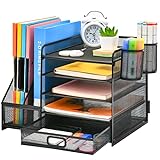
9. Marbrasse Mesh Desk Organizer — Best Desk Organizer
Even a clean digital workflow does not eliminate pens, highlighters, calculators, sticky notes, and other school supplies.
A Marbrasse mesh desk organizer provides designated storage for frequently used items without requiring built-in desk drawers.
It can help organize:
Pens and pencils
Highlighters
Sticky notes
Scissors
Calculators
Small notebooks
Miscellaneous study supplies
Best for: Students with stationery-heavy classes or desks without much storage.
Avoid turning an organizer into permanent storage for things you never use. Keeping only frequently needed supplies on your desk preserves valuable work space.
Give pens, highlighters, sticky notes, calculators, and other essentials a dedicated home. The Marbrasse Mesh Desk Organizer keeps frequently used supplies accessible while helping reduce desktop clutter.
10. Time Timer MOD — Best Accessory for Focus Sessions
A smartphone timer works perfectly well until checking the timer turns into checking messages, Instagram, TikTok, or email.
The Time Timer MOD offers a dedicated visual representation of remaining time. Students can use it for focused study blocks, practice exams, reading periods, or structured breaks.
Why consider it:
Visual countdown
No smartphone required
Suitable for timed study sessions
Useful for Pomodoro-style routines
Small desktop footprint
Best for: Students who benefit from visual time management or want fewer reasons to reach for their phone while studying.
This is more specialized than a desk lamp or mouse, so buy it only if dedicated time tracking fits your study habits.
Make study blocks easier to track with the Time Timer MOD. Its visual countdown lets you see how much time remains without reaching for your phone, making it useful for focused work, practice tests, and structured breaks.
11. IKEA SIGNUM — Best Under-Desk Cable Management
Individual cable clips work well for a few wires. A setup with a power strip, several chargers, and longer cables may need something more substantial.
The IKEA SIGNUM cable management solution can move cords away from the desktop and floor, helping create a cleaner workspace.
Why it is useful:
Reduces visible cable clutter
Keeps wires away from the main work surface
Useful for permanent setups
Can make the area underneath a desk easier to manage
Best for: Students building a more permanent bedroom or apartment workstation.
Because mounting may be required, check your desk and dorm policies before installation.
Create a cleaner study station by moving cables and power cords out of the way with IKEA SIGNUM. This under-desk cable management solution is especially useful for more permanent dorm, bedroom, or apartment setups.
12. Everlasting Comfort Foot Rest — Best Comfort Upgrade
College students rarely get to choose the exact dimensions of dorm furniture. If your chair and desk heights do not work well together, a footrest may make your sitting position more comfortable.
The Everlasting Comfort Foot Rest is a cushioned under-desk option designed to support the feet during seated work.
It may be worth considering if:
Your feet do not rest comfortably on the floor
Your desk is relatively high
You study while seated for long periods
You prefer cushioned foot support
Best for: Students whose current desk and chair combination leaves their feet unsupported.
Comfort is personal, so a footrest should solve an actual seating problem rather than simply becoming another accessory.
Give your feet a cushioned place to rest during long study sessions. The Everlasting Comfort Foot Rest can be a useful addition when your desk and chair height leave your feet without comfortable support.
13. Post-it Super Sticky Notes — Best Simple Study Essential
Not every productivity tool needs an app.
Post-it Super Sticky Notes remain useful for quick reminders, formulas, vocabulary, assignments, and short to-do lists. They are inexpensive, easy to find in the U.S., and require almost no desk space.
Good uses include:
Daily priorities
Exam reminders
Vocabulary
Formulas
Quick study notes
Assignment deadlines
Best for: Students who prefer visible reminders.
Try keeping only a few important notes visible. Too many sticky notes can quickly become visual clutter.
Keep deadlines, formulas, vocabulary, and daily priorities where you can see them. Post-it Super Sticky Notes offer a quick, simple way to organize study reminders without adding another app to your routine.
14. EURPMASK Headphone Hanger — Best Headphone Storage
Over-ear headphones are useful for online classes, music, gaming, and studying in shared spaces, but they consume a surprising amount of desktop space.
A headphone hanger moves them off the main work surface while keeping them within reach. EURPMASK offers under-desk hanger options designed for this purpose.
Why it helps:
Frees desktop space
Keeps headphones accessible
Useful for gaming and study setups
Helps maintain a cleaner workstation
Best for: Students who regularly use over-ear headphones.
Verify the mounting method and make sure it is appropriate for your desk.
Free up valuable desktop space while keeping your headphones close at hand. The EURPMASK Headphone Hanger provides a dedicated storage spot for over-ear headphones when they are not in use.
15. Simple Houseware Monitor Stand Riser — Best Monitor Stand
Students using an external monitor may want to raise the screen while creating a little additional storage underneath.
A Simple Houseware Monitor Stand Riser is a straightforward alternative to installing a monitor arm. Depending on the specific model, the area underneath can also hold notebooks or smaller desk supplies.
Benefits include:
Raises the monitor
Creates usable storage space
No complex monitor-arm installation
Works well for permanent study stations
Helps organize smaller accessories
Best for: Students with external monitors and limited storage.
Always confirm that the stand dimensions and weight capacity are suitable for your monitor.
Elevate your monitor while creating useful storage space underneath. The Simple Houseware Monitor Stand Riser is a straightforward option for students who want a more organized desktop without installing a monitor arm.
How We Chose the Best Desk Accessories for Students
There are thousands of desk gadgets online, but students have specific priorities. Limited space, budget, portability, and compatibility often matter more than premium materials or elaborate features.
When selecting the best desk accessories for students in this guide, we prioritized practical utility, compact design, recognizable brands or commonly available products, suitability for everyday studying, and availability to shoppers in the U.S.
We also looked for accessories that solve common student problems rather than products that exist mainly for decoration. Those problems include poor lighting, limited laptop ports, cable clutter, small desk surfaces, device charging, stationery storage, and uncomfortable laptop positioning.
No single product will fit every student. Current prices, reviews, specifications, seller information, and compatibility should be checked before you make a final purchase.
What Desk Accessories Do Students Actually Need?
You probably do not need everything on this list.
Start by identifying what causes friction during a normal study session. If you constantly run out of ports, a USB-C hub makes sense. If cables cover your desk, start with cable management. If your room is dark, prioritize a desk lamp.
For many students, the most useful desk essentials are a good lamp, laptop stand, mouse, charging solution, and basic cable management.
After that, add products based on how you actually study.
Best Desk Accessories for Students in Dorm Rooms
Dorm desks require careful use of space. Large organizers and unnecessary tech can quickly leave you with nowhere to open a textbook.
The best desk accessories for students living in dorms tend to be compact, portable, or capable of freeing existing desktop space. A slim wireless mouse, compact keyboard, cable clips, laptop stand, and small lamp can make more sense than bulky accessories.
Products that attach beneath the desk can also save space, but dorm rules matter. Avoid drilling, screwing, or applying strong adhesives to college-owned furniture unless your housing policy permits it.
Best Desk Accessories for a Small Study Space
A small desk does not necessarily require fewer functions—it requires products that perform those functions efficiently.
Look for vertical storage, compact wireless peripherals, laptop stands that create usable space underneath, and charging stations that consolidate several connections into one location.
A large desk mat can work too, provided it fits your desk dimensions. Measuring your desk before ordering accessories is one of the easiest ways to avoid wasted money.
Best Desk Accessories for Laptop Users
Laptop users can build a capable study station without buying a desktop computer.
A useful setup might combine a laptop stand, compact external keyboard, wireless mouse, USB-C hub, and charging solution. If you study primarily at home, an external monitor can provide additional screen space for research, writing, coding, or coursework.
Compatibility is particularly important here. Check your laptop’s ports and display capabilities before buying a hub, monitor, or charging accessory.
How to Choose Student Desk Accessories
When comparing student desk accessories, prioritize function before appearance. A product should solve a recurring problem or make a task you perform frequently more convenient.
Consider four things before buying: available desk space, device compatibility, how frequently you will use the accessory, and total cost.
Portability matters too. A college student who studies in three different locations may benefit more from a compact mouse and USB-C hub than from accessories permanently mounted to a dorm desk.
How Much Should Students Spend on Desk Accessories?
There is no reason to build your entire desk setup in one shopping trip.
If you have a tight budget, affordable upgrades such as cable clips, sticky notes, a desk mat, or basic organization can make an immediate difference. If you can spend more, prioritize equipment you expect to use every day.
Lighting, input devices, charging, and laptop positioning generally deserve attention before decorative upgrades.
The best desk accessories for students are not necessarily the most expensive ones. Value comes from how often an accessory improves your actual study routine.
Tech vs. Non-Tech Desk Accessories
A useful study environment needs balance.
Tech accessories such as USB-C hubs, wireless keyboards, mice, and charging stations can make your devices easier to use. Traditional school supplies such as sticky notes, organizers, and good lighting remain equally relevant.
Buying more technology does not automatically increase productivity. A simple, uncluttered workspace with a few well-chosen tools can be more effective than a desk packed with gadgets.
Frequently Asked Questions
What are the best desk accessories for students?
The best desk accessories for students include a reliable desk lamp, laptop stand, wireless mouse, compact keyboard, USB-C hub, charging solution, desk mat, and cable organizers. Which ones you need depends on your devices, desk size, budget, and study routine.
What are the best college desk accessories?
Useful college desk accessories include compact lighting, charging stations, cable organizers, laptop stands, wireless peripherals, desk organizers, and headphone storage. For dorm rooms, prioritize small accessories that do not permanently modify university furniture.
What should every student have on their desk?
Most students benefit from good lighting, reliable charging access, basic organization, and enough clear space for a laptop, textbook, or notebook. Additional accessories should address specific needs rather than simply fill available space.
What are the best desk accessories for studying?
A desk lamp, laptop stand, external mouse and keyboard, cable management, and a timer are useful study desk accessories. Students who mostly work with physical books may prioritize lighting and organization, while laptop-heavy students may benefit more from peripherals and a USB-C hub.
Are desk accessories worth buying for college?
They can be, especially when an accessory fixes a problem you encounter every day. Start with affordable essentials and add products gradually rather than purchasing a complete desk setup at once.
What are the best desk accessories for a small dorm room?
Compact accessories are usually the better choice. Consider a small LED desk lamp, slim wireless mouse, compact keyboard, laptop stand, cable clips, and a space-efficient charging solution.
What desk accessories make a good gift for a student?
Desk lamps, wireless mice, desk mats, cable organizers, USB-C hubs, and stationery can make practical gifts. For electronic products, check the student’s laptop or device compatibility first.
Final Verdict
Choosing the best desk accessories for students comes down to making limited desk space work harder.
The Anker 332 USB-C Hub is a practical choice for students who need additional laptop connectivity, while the Nulaxy C3 Laptop Stand can improve a laptop-centered workstation. A compact LED desk lamp is a strong everyday upgrade, and inexpensive products such as OHill Cable Clips can help organize a setup without consuming much of your budget.
Do not feel pressured to buy every recommendation. Start with the accessories that solve your biggest study-space problems, then build your college desk setup gradually.
A clean desk, reliable lighting, accessible charging, and a comfortable way to use your computer will usually provide more value than filling your workspace with trendy gadgets.