Best Wireless Keyboards for Students in 2026: 5 Picks
August 23, 2026 / By
mind life up / 12 minutes of reading
Disclosure: This post contains affiliate links. As an Amazon Associate, we earn from qualifying purchases at no extra cost to you.
Read more
Between lecture notes, essays, research papers, emails, and group projects, students type a lot. A comfortable keyboard can make those hours at your laptop easier, especially when your built-in keyboard feels cramped or you prefer a cleaner desk setup.
The best wireless keyboard for students should fit your actual study routine. For some students, that means a small Bluetooth keyboard that slips into a backpack. For others, it means comfortable keys for long papers or a full-size layout with a number pad for Excel, statistics, finance, or accounting.
We narrowed this guide down to five options for different types of students, with a focus on Windows compatibility, portability, typing comfort, battery setup, and useful everyday features.
Quick Picks
🥇 Best Overall: Logitech Pebble Keys 2 K380s A compact, quiet choice that makes sense for most students.
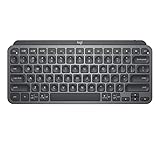
✍️ Best for Essays: Logitech MX Keys Mini A premium compact keyboard for students who type for hours.
💻 Best Premium Full-Size Pick: Microsoft Surface Keyboard (2nd Edition) A strong option for Windows-focused desk setups.
📱 Best for Multiple Devices: Logitech K585 Useful if you study with a laptop plus a phone or tablet.
💰 Best Budget Full-Size Pick: iClever BK10 SE A lower-cost choice for students who still want a number pad.
Short on time? The Logitech Pebble Keys 2 K380s is the easiest place to start for most students because it combines portability, quiet typing, and multi-device support without taking up much backpack space.
You do not need the keyboard with the longest feature list. You need one that fits where you study and what you type.
Think About Where You’ll Use It
A compact wireless keyboard usually makes more sense if it travels between class, the library, and your dorm.
Study mostly at one desk? A larger model can give you more room to type and may include a dedicated number pad.
Pay Attention to Typing Noise
Quiet keys are especially useful in libraries, shared dorm rooms, classrooms, and late-night study sessions.
You do not need a completely silent keyboard, but avoiding unnecessarily loud keys can make shared study spaces much easier.
Consider Multi-Device Bluetooth
If you regularly use a Windows laptop alongside a tablet or phone, multi-device pairing can be surprisingly convenient.
Instead of disconnecting and pairing your keyboard again, compatible models let you switch between saved devices.
Choose the Right Battery Setup
There are two good approaches.
Replaceable batteries can offer very long runtimes with little maintenance. Rechargeable keyboards eliminate replacement batteries and may be more convenient if you already keep a USB-C cable in your bag.
Decide Whether You Really Need a Numpad
A number pad is useful for Excel, data entry, statistics, accounting, and similar coursework.
For essay writing, browsing, coding, and regular note-taking, removing the numpad makes a keyboard smaller and easier to carry.
The 5 Best Wireless Keyboards for Students
Logitech Pebble Keys 2 K380s
Best Overall for Most Students
The Logitech Pebble Keys 2 K380s hits a useful middle ground between portability and everyday usability.
Its compact shape makes it much easier to fit into a student backpack than a full-size keyboard, while quiet keys make it better suited to libraries, classrooms, and shared spaces.
It can also connect to up to three devices, which is useful if your school setup includes a Windows laptop, tablet, or phone.
Why Students May Prefer It
Portability is the biggest reason to consider the K380s.
A wireless keyboard does not help much on campus if it is too bulky to carry. The Pebble Keys 2 keeps the footprint small without focusing on unnecessary extras.
The long advertised battery life also means you should not need to think about charging it every few days. Logitech rates the K380s for up to 36 months, though actual battery life will depend on use.
What We Like
✅ Small enough for regular campus carry ✅ Quiet typing for shared study areas ✅ Connects with up to three devices ✅ Long advertised battery life ✅ Simple choice for everyday schoolwork
Keep in Mind
❌ No dedicated number pad ❌ Typing feel is less premium than the MX Keys Mini ❌ Students coming from full-size keyboards may need time to adjust
Who Should Buy It?
Choose the K380s if you want one portable Bluetooth keyboard for notes, assignments, emails, research, and everyday college work.
Skip it if you regularly enter large amounts of numerical data and need a dedicated numpad.
Bottom Line
For most students, the Pebble Keys 2 K380s offers the best balance of portability, quiet typing, battery life, and multi-device flexibility.
Compact, quiet, and easy to carry, the K380s is a great fit for everyday classes, notes, and assignments.
Logitech MX Keys Mini
Best for Essays and Long Writing Sessions
If papers and long-form writing dominate your workload, the Logitech MX Keys Mini is the premium upgrade worth considering.
It stays compact but focuses more heavily on typing feel than basic portable keyboards. Backlit keys are another practical advantage when you are working in a dim dorm room or finishing an assignment late at night.
Why It Stands Out
The MX Keys Mini makes the most sense for students who type enough to notice the difference between a basic keyboard and a more refined one.
It is rechargeable via USB-C and supports switching among multiple paired devices. You get those features without moving to a bulky full-size design.
The tradeoff is price. If you only type occasionally, paying more for the MX Keys Mini may not deliver much practical value over the K380s.
What We Like
✅ Comfortable option for extended typing ✅ Backlit keys for low-light study sessions ✅ USB-C rechargeable ✅ Multi-device connectivity ✅ Compact enough for smaller desks
Keep in Mind
❌ Costs more than basic student keyboards ❌ No dedicated number pad ❌ May be more keyboard than casual users need
Who Should Buy It?
The MX Keys Mini fits students who spend hours writing essays, reports, research papers, or notes and are willing to pay more for typing comfort.
For basic homework and occasional typing, the cheaper K380s is likely enough.
Bottom Line
If typing comfort matters more to you than getting the lowest price, the MX Keys Mini is one of the stronger compact Bluetooth keyboards for a Windows study setup.
A premium compact pick for students who spend hours writing essays, reports, and research papers.
Microsoft Surface Keyboard (2nd Edition)
Best Premium Full-Size Keyboard for Windows
Some students need portability. Others want a comfortable keyboard that stays on their dorm or home desk.
The Microsoft Surface Keyboard (2nd Edition) is aimed at the second group.
Its full-size layout and dedicated number pad make it particularly useful for students who work frequently with spreadsheets, calculations, data, or business software.
Why It Stands Out
This keyboard makes the most sense in a Windows-first setup.
You get a familiar full-size layout with more room than compact portable models. That extra space can be useful during longer desktop sessions, particularly when your coursework involves numbers.
The downside is easy to spot: this is not the keyboard we would choose for carrying around campus every day.
What We Like
✅ Full-size layout ✅ Dedicated number pad ✅ Natural fit for Windows users ✅ Clean design for a permanent desk setup ✅ Useful for spreadsheet-heavy coursework
Keep in Mind
❌ Much less portable than compact alternatives ❌ Requires more desk space ❌ Not ideal if your keyboard lives in your backpack
Who Should Buy It?
Consider the Surface Keyboard if you mainly study at a desk, use Windows, and want a premium full-size layout.
Students moving between classes throughout the day will probably be happier with one of the compact Logitech options.
Bottom Line
For a Windows-focused study desk where portability is not a priority, the Surface Keyboard offers the full-size layout many compact student keyboards leave out.
A full-size Windows-friendly option with a numpad for spreadsheets, data entry, and desk-based studying.
Logitech K585 Multi-Device Slim Wireless Keyboard
Best for Laptop + Phone or Tablet Studying
The Logitech K585 addresses a different student problem: working across multiple screens.
Its built-in cradle gives you a convenient place to keep a compatible phone or tablet upright while you work. That can be useful for viewing references, checking a class app, reading material, or keeping another screen visible beside your laptop.
Why It Stands Out
The device cradle is the main reason to choose the K585 over a conventional wireless keyboard.
It also offers Easy-Switch functionality for moving between compatible connected devices. Better still for numbers-heavy coursework, the layout includes a dedicated number pad.
That makes the K585 an interesting middle ground: more functionality than an ultra-compact keyboard without going all the way to a traditional bulky desktop setup.
What We Like
✅ Built-in cradle for a phone or tablet ✅ Easy switching between compatible devices ✅ Dedicated number pad ✅ Slimmer profile than many desktop keyboards ✅ Useful for multi-screen study setups
Keep in Mind
❌ Larger than the K380s and MX Keys Mini ❌ Not the most minimal option for backpack carry ❌ Less premium typing experience than the MX Keys line
Who Should Buy It?
Choose the K585 if you frequently keep a phone or tablet next to your laptop while studying and want a keyboard that supports that workflow.
If maximum portability matters more, get the K380s instead.
Bottom Line
The K585 is a practical choice for students who want multi-device flexibility, a built-in device cradle, and a number pad in one setup.
A practical choice if you switch between a laptop, phone, or tablet and still want a dedicated numpad.
iClever BK10 SE
Best Budget Full-Size Pick
Not every student needs to spend premium-keyboard money.
The iClever BK10 SE is worth considering if your priorities are a full-size layout, Bluetooth connectivity, a number pad, and rechargeable convenience at a more budget-conscious price point.
That combination makes it particularly relevant to students studying accounting, statistics, economics, finance, or other subjects that involve frequent number entry.
Why It Stands Out
The value proposition is simple: it gives you several productivity-focused features without requiring you to step up to a more expensive premium model.
It supports multiple Bluetooth devices and USB-C charging, while the full-size design avoids one of the biggest limitations of compact keyboards: no dedicated numpad.
There is a tradeoff. Students who care most about refined typing feel or brand-specific software may still prefer Logitech or Microsoft.
What We Like
✅ Budget-friendly full-size option ✅ Dedicated number pad ✅ Multi-device Bluetooth support ✅ USB-C rechargeable ✅ Useful for spreadsheets and numerical coursework
Keep in Mind
❌ Less polished than premium alternatives ❌ Larger size reduces portability ❌ Typing feel may not appeal to students seeking a premium experience
Who Should Buy It?
The BK10 SE is best suited to students who need a number pad and full-size layout while trying to keep costs down.
If your keyboard needs to travel to class every day, a compact option will be easier to manage.
Bottom Line
For budget-conscious students who prioritize a numpad over backpack portability, the iClever BK10 SE delivers the features that matter most.
An affordable full-size Bluetooth keyboard with a numpad and USB-C charging for everyday coursework.
Which Student Keyboard Should You Buy?
Still deciding? Match the keyboard to the way you study:
Choose the Logitech Pebble Keys 2 K380s if you want the best all-around balance for campus life.
Get the Logitech MX Keys Mini if you write for hours and care most about typing comfort.
Pick the Microsoft Surface Keyboard if you want a premium, full-size Windows desk setup.
Choose the Logitech K585 if your workflow regularly includes a laptop plus a phone or tablet.
Consider the iClever BK10 SE if you need a full-size keyboard and numpad on a tighter budget.
For most college students who are unsure where to start, the K380s remains the easiest recommendation. Students who rarely move their keyboard and work heavily with numbers should look at the full-size choices instead.
The Logitech Pebble Keys 2 K380s is our overall pick for most students because it combines a compact design, quiet typing, multi-device connectivity, and long advertised battery life. However, students who write for hours may prefer the MX Keys Mini, while spreadsheet-heavy users may benefit more from a full-size keyboard with a numpad.
What is a good Bluetooth keyboard for a Windows laptop?
The right choice depends on your setup. The Pebble Keys 2 K380s is a practical portable option, while the Microsoft Surface Keyboard (2nd Edition) is better suited to students who want a full-size Windows desk keyboard. The MX Keys Mini is another strong choice if typing comfort is the priority.
Is a compact keyboard good for college?
Yes. A compact keyboard takes up less backpack and desk space, making it particularly useful for students who move between classrooms, libraries, dorms, and coffee shops. The main compromise is typically the lack of a dedicated number pad.
Do I need a number pad for college?
Most students do not. A numpad becomes much more useful if you regularly work with spreadsheets, financial data, statistics, or numerical entry. Accounting, finance, business, and some STEM students may benefit from a full-size layout.
Is Bluetooth or a USB receiver better for students?
Bluetooth can be convenient because you do not have to keep track of a separate USB receiver or occupy a laptop port. A receiver can still make sense in specific setups, but for portable student use, Bluetooth keeps things simple.
How long does a wireless keyboard battery last?
Battery life varies significantly by keyboard, lighting settings, usage, and connection type. Some keyboards use replaceable batteries designed to last for months or even years, while rechargeable models need periodic charging. Check the current manufacturer specifications before buying, since features and estimates can vary by model or version.
Final Verdict
For most students, the Logitech Pebble Keys 2 K380s is the best place to start. It is compact enough for campus, designed for quieter typing, and supports multiple devices without adding much bulk to your setup.
The MX Keys Mini is the more appealing upgrade if you spend hours writing papers and want a more premium typing experience.
Students working heavily with Excel, accounting, finance, or numerical data should prioritize a number pad instead. The Microsoft Surface Keyboard offers a more premium full-size Windows setup, while the iClever BK10 SE targets students looking for a more affordable alternative.
And if you regularly study with a phone or tablet beside your laptop, the Logitech K585 is the most purpose-built option in this group.
There is no reason to pay extra for features your coursework does not need. Choose based on where you study, how much you type, and whether portability or a number pad matters more.
Affiliate disclosure: Mind Life Up may earn a commission from qualifying purchases made through links on this page, at no extra cost to you.