Best Graphing Calculator for Students in 2026: Top Picks for High School and College
September 12, 2026 / By
mind life up / 9 minutes of reading
Disclosure: This post contains affiliate links. As an Amazon Associate, we earn from qualifying purchases at no extra cost to you.
Read more
If you’re looking for the best graphing calculator for students, the right choice depends on your classes, budget, and whether you need it for standardized exams.
A good graphing calculator can make a big difference in school and college. Whether you’re studying math, engineering, science, business, or another subject that requires advanced calculations, the right model can help you solve problems faster and work more confidently.
Some calculators are ideal for everyday classroom use and exam prep, while others offer more advanced features for calculus, statistics, physics, engineering, and college-level math.
To make your choice easier, we compared the top graphing calculators for students in 2026 based on features, ease of use, exam compatibility, and overall value.
The TI-84 Plus CE is still the safest pick for most buyers. It offers the best balance of ease of use, classroom support, portability, and long-term value.
This is one of the most trusted options on Amazon, with a 4.7-star rating from 47,679 reviews and 8K+ bought in the past month.
Why it stands out
The biggest strength of the TI-84 Plus CE is familiarity. Many teachers use it in class, many students already know it, and there are endless tutorials online.
That matters more than most students expect. When you are preparing for a quiz or sitting in an exam, a familiar calculator can save time and reduce mistakes.
It also includes a full-color backlit display, which makes graphs easier to read than older black-and-white models. The MathPrint feature is another plus because it shows equations in a more natural format.
Key features
3.2-inch full-color backlit display
Rechargeable battery
MathPrint display
Preloaded apps and images
14 interactive zoom features
Seven graph styles
Slim design with multiple color options
Pros
Great for both high school and college students
Easy to learn
Huge user base and strong classroom support
Rechargeable battery is more convenient than disposable batteries
Excellent for algebra, precalculus, calculus, and statistics
Cons
More expensive than budget models
Not as advanced as a CAS graphing calculator
Interface feels more traditional than newer premium models
Best for
High school students
General college students
Parents buying one calculator for long-term use
Students who want the safest all-around choice
The TI-84 Plus CE remains the best graphing calculator for students overall because it combines reliability, usability, and wide classroom acceptance better than almost anything else.
The best all-around graphing calculator for high school, college, and test prep.
2) Texas Instruments TI-Nspire CX II CAS
Best for College
If the TI-84 Plus CE is the safe all-purpose option, the TI-Nspire CX II CAS is the stronger choice for students who need more power.
This model is especially useful for college-level work. It has a 4.7-star rating from 9,387 reviews, includes student software for PC and Mac, and gives you CAS support for more advanced symbolic math.
Why it stands out
The main reason to choose this model is capability. The TI-Nspire CX II CAS is built for tougher math and science courses.
If you are taking advanced algebra, calculus, matrices, physics, or engineering, the added power is worth it. It can handle more complex workflows than the TI-84 line.
It also has a 3.5-inch color screen, a thinner design, and touchpad navigation, so it feels more modern in daily use.
Key features
3.5-inch color screen
320 x 240 resolution with 16-bit color
Rechargeable battery
Up to two weeks on a single charge
Includes TI-Nspire CX Student Software for PC/Mac
Touchpad navigation
Quick alpha keys
Six graph styles and 15 color choices
CAS functionality
Pros
Excellent for college STEM courses
More advanced than the TI-84 series
Includes student software
Rechargeable battery with strong battery life
Better for complex math and engineering tasks
Cons
Learning curve is steeper
CAS models may not fit every classroom or test policy
More power than many high school students actually need
Best for
College students
Engineering majors
Advanced math students
Students who want software and handheld functionality together
If you need a graphing calculator for college students in STEM, this is one of the strongest options available.
A stronger pick for advanced math, engineering, and college STEM coursework.
3) Casio fx-9750GIII
Best Budget
For buyers who want a lower price without giving up core features, the Casio fx-9750GIII is the best budget choice in this roundup.
At $67.44, it costs much less than the top TI models. Even so, it still has a 4.7-star rating from 3,569 reviews and a feature set that covers much more than basic graphing.
Why it stands out
This is the calculator for smart budget shoppers. It gives students the tools they need for class while staying far more affordable.
Casio also includes helpful extras like MicroPython programming, USB connectivity, and a Natural Textbook Display that makes expressions easier to read.
Another major advantage is exam approval. It is listed as approved for AP, SAT, ACT, IB, and other standardized tests, which makes it very attractive for high school use.
Key features
Natural Textbook Display
Battery powered
Graph plotting, vectors, spreadsheets, integrals, and probability distributions
eActivities support
MicroPython programming
USB cable connectivity
Approved for AP, SAT, ACT, IB, and more
Pros
Excellent value for the price
Strong fit for school and exam use
Good range of math and science functions
Python support is a useful bonus
Easy-to-read natural display
Cons
Less premium feel than higher-priced models
Not as polished as top TI or HP models
Fewer students are familiar with it compared with TI calculators
Best for
Budget-conscious students
High school students
Standardized test prep
Families shopping at a lower price point
If you want the best budget graphing calculator for students, this is one of the easiest recommendations.
A smart low-cost graphing calculator for school and exam use.
4) Casio fx-CG50
Best for Visual Learning
The Casio fx-CG50 is a more specialized pick, but it can be an excellent match for the right student.
It is designed for users who want stronger visual graphing tools, more advanced functions, and support for both 2D and 3D graph analysis.
Why it stands out
The biggest selling point is the display. It uses a Color LCD with 384 x 216 resolution and 65,536 colors, which makes graphs easier to separate visually.
That can be especially helpful for visual learners who prefer a more color-rich graphing experience.
It also offers over 1,200 functions and includes Python functionality, so it fits more technical users better than the average classroom calculator.
Key features
Color LCD, 384 x 216 dots
65,536 colors
Over 1,200 functions
2D and 3D graph drawing and analysis
Python functionality
Up to 61,000 bytes RAM
7.4 x 3.5 x 0.7 inches
8.1 oz
Pros
Strong visual graphing experience
Supports both 2D and 3D graphing
Good fit for advanced technical users
Python support adds flexibility
Broad function library
Cons
Higher price than several stronger mainstream alternatives
Far fewer reviews than leading TI and Casio models
Buyers should double-check whether it fits their exact class needs
Best for
Visual learners
Students who want a color graphing calculator
Advanced technical users
Students interested in Python features
This is not the default choice for every buyer, but it stands out if visual graphing matters more than mainstream popularity.
A great option for color graphing, visual analysis, and advanced features.
5) HP Prime G2
Best Premium Pick
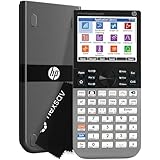
The HP Prime G2 is the premium option in this guide. It is built for students who want a more modern interface, faster interaction, and advanced features in one device.
It has a 4.4-star rating from 1,920 reviews, a 3.5-inch multi-touch color display, and CAS support for more advanced math work.
Why it stands out
This calculator feels more modern than most competitors. The multi-touch display, pinch-to-zoom, and interactive graph controls make it feel closer to a smart device than a traditional calculator.
It also includes advanced tools like dynamic geometry, spreadsheet apps, RPN, and dedicated keys for switching between symbolic, graphical, and numerical views.
That makes it a strong fit for students who want speed, flexibility, and a premium experience.
Key features
3.5-inch multi-touch color display
CAS support
Pinch-to-zoom and interactive graph manipulation
Dynamic geometry and spreadsheet apps
Dedicated symbolic, graphical, and numerical controls
256 MB flash memory
Rechargeable lithium-ion battery
Includes case and cloth
HP Prime Mobile App support
Wireless ecosystem support
Approved for PSAT/NMSQT, SAT, IB, and select AP exams
Pros
Most modern interface in this list
Excellent for advanced users
Large feature set for STEM work
Rechargeable battery
Strong premium choice for long-term use
Cons
Premium price
More capability than many students need
Exam approval varies by test, so policies should be checked carefully
Best for
College students
Advanced math and STEM students
Buyers who want a premium graphing calculator
Students who prefer a more modern touchscreen-style experience
If budget is less of a concern, the HP Prime G2 is one of the most impressive high-end options available.
A high-end graphing calculator with a modern interface and advanced tools.
How to Choose
Buying the best graphing calculator for students is not just about picking the most expensive model. The better choice is the one that fits your classes and how you actually study.
1) Match it to your classes
If you are taking algebra, precalculus, or AP Statistics, you may not need a premium model.
If you are studying engineering, physics, or advanced mathematics, a more powerful CAS graphing calculator may be worth the extra cost.
2) Set your budget
Price matters. A calculator in the $65 to $75 range can still handle years of schoolwork.
Not every student needs to spend $150 for a good result.
3) Check the learning curve
Some models are easier to learn than others. The TI-84 Plus CE is one of the easiest to pick up.
CAS models and touch-based calculators offer more power, but they usually take longer to master.
4) Look at the screen
A color display can improve visual clarity, especially if you struggle with crowded graphs.
For some students, a better screen makes studying easier.
5) Verify exam approval
Always check test rules before buying. Approval can vary for SAT, ACT, AP, IB, and PSAT/NMSQT, especially when CAS models are involved.
6) Think long-term
A good graphing calculator can last from high school into college.
That makes it worth paying a little more if you expect to use it for several years.
Best by Student Type
Best for high school students
TI-84 Plus CE
It is easy to learn, widely recognized, and practical for common high school math classes.
Best for college students
TI-Nspire CX II CAS
It offers more power for advanced coursework and engineering-style problem solving.
Best budget graphing calculator
Casio fx-9750GIII
Affordable, capable, and strong for exams and everyday school use.
Best premium graphing calculator
HP Prime G2
The most modern and feature-rich model in this list.
Best for visual learners
Casio fx-CG50
Its display and advanced graphing tools make it stand out.
Which One Should You Buy?
If you want the easiest all-around answer, start with the TI-84 Plus CE. It is still the safest choice for most students.
Choose the TI-Nspire CX II CAS if you need more advanced functionality for college math, science, or engineering.
Choose the Casio fx-9750GIII if you want the best value and need a reliable graphing calculator for high school students or exam prep.
Choose the Casio fx-CG50 if display quality and visual graphing matter most.
Choose the HP Prime G2 if you want a premium calculator with a more modern interface.
Ready to Check the Best Picks?
Best Overall: Texas Instruments TI-84 Plus CE
Best for College: Texas Instruments TI-Nspire CX II CAS
Best Budget: Casio fx-9750GIII
Best for Visual Learning: Casio fx-CG50
Best Premium: HP Prime G2
Check the latest prices and availability before they change.